The 12 Best Apps for Productivity for Entrepreneurs in 2026
Your phone probably has four task apps on it. You've opened two of them since January. Most founders hunting for the best apps for productivity aren't missing an app. They're drowning in the ones they already downloaded. So this isn't a list of 30 tools to install. It's 12 apps worth your time in 2026, each tagged with the one job it actually does, so you can build a tight stack instead of another pile. People ask what the single best productivity app is. There isn't one. There's a stack, and the right tool depends on the job you need done. Pick one per job and stop.
The short answer: the best productivity app is the one you'll actually open tomorrow, not the one with the longest feature list.
Every app below had to clear four bars. It reduces friction instead of adding it. It syncs across the devices you actually carry. It does one clear job well. And it survives a brutal week without getting abandoned by Thursday. We also checked where each free plan caps out, because a "free" tool that locks you at ten tasks isn't free, it's a trial wearing a free badge. Each pick is sorted under one of the five jobs a founder's stack has to cover: capture, plan, focus, automate, and delegate. Taken together, these are the tools for entrepreneurs who'd rather ship than tinker.
Quick Picks
Best overall task manager: Todoist
Best for Apple-only founders: Things 3
Best free stack starter: Microsoft To Do + Google Calendar + ChatGPT free tier
Best AI scheduler: Motion
Best for intentional planners: Sunsama
Best automation tool: Zapier
Best AI assistant: ChatGPT (with Lindy close behind for agentic work)
Pricing and AI features on these tools move fast, so treat every specific figure below as "as of mid-2026" and verify the current number before you commit.
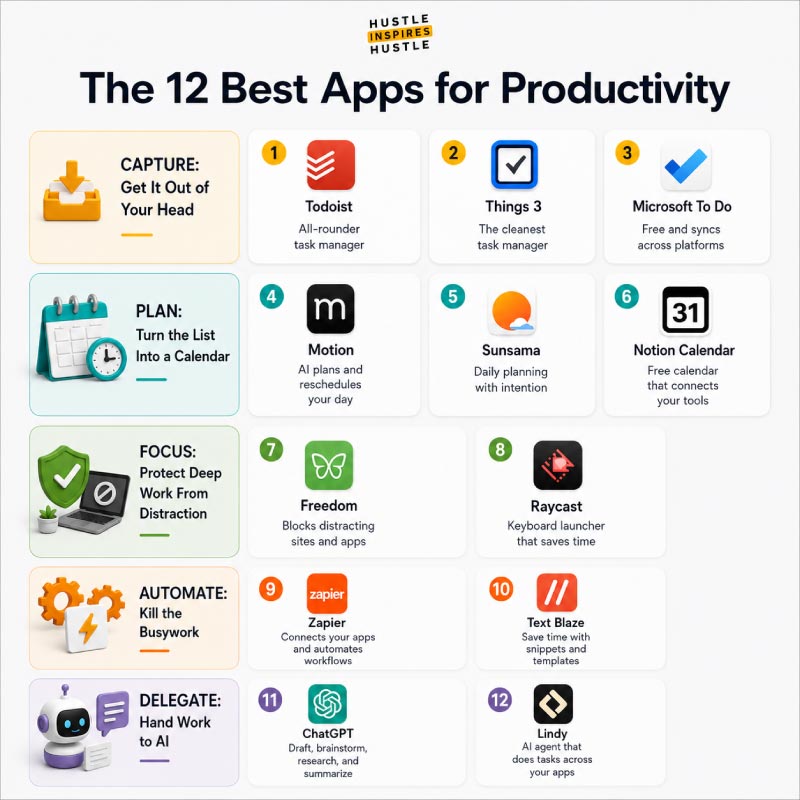
The 12 Best Apps for Productivity in 2026
Capture: Get It Out of Your Head
Capture comes first in Getting Things Done for a reason: your brain is built for having ideas, not storing them. The capture tool's only job is to catch the task before it slips.
1. Todoist The job: capture. Todoist is the all-rounder task manager, fast to log into, structured enough for real projects, and available on basically every device. The free plan handles a solo founder's daily load well. If you want one task manager and no fuss, start here.
2. Things 3 The job: capture. The cleanest task manager in the Apple ecosystem, full stop. It's a one-time purchase rather than a subscription, with a design that makes logging a task almost frictionless. The catch: it's Apple-only, so skip it if you live on Windows or Android.
3. Microsoft To Do The job: capture, free. Genuinely free, no asterisk, and it syncs across platforms while plugging straight into Outlook. It won't win a feature war, but it does the core job (catch the task before you forget it) without ever asking for your card.
Plan: Turn the List Into a Calendar
The difference between a task manager and a planner is simple. One holds what you should do. The other decides when you'll do it.
4. Motion The job: plan, AI. Motion uses AI to build and constantly reschedule your day around your tasks and meetings. When a call runs long, it reshuffles everything automatically. It runs at a premium price (verify the current rate), and it earns its keep most for founders whose days get blown up daily.
5. Sunsama The job: plan, intentional. The opposite philosophy to Motion. Sunsama walks you through a deliberate daily planning ritual, pulling tasks in one at a time so you commit to a realistic day instead of an aspirational one. It has run around $20 per month as of mid-2026. Worth it if your problem is overcommitting, not scheduling chaos.
6. Notion Calendar The job: plan, free. A clean calendar layer (formerly Cron) that connects to your Google Calendar and your Notion workspace. Free, fast, and a solid bridge if your tasks already live in Notion. Pair it with a real planner if you need time-blocking muscle.
Focus: Protect Deep Work From Distraction
These two tools exist to protect deep work for founders who have no one guarding their calendar but themselves. And the research on context switching is blunt: every jump between the build and the inbox costs a reset you never see on an invoice.
7. Freedom The job: focus. Blocks distracting sites and apps across all your devices at once, so the temptation is gone instead of one tap away. Think of it as a fence, not a cure. It won't fix a calendar you overloaded, but it makes a planned deep work block actually happen.
8. Raycast The job: focus, speed. A keyboard launcher (Mac) that cuts the click-hunting out of your day. Open apps, run snippets, control tools, all without leaving the keyboard. The free tier is generous. It's the kind of tool you don't notice saving you time until you go back to clicking around.
Automate: Kill the Busywork
In two steps, map the repetitive task, then hand it to an automation tool, most founders reclaim hours a week.
9. Zapier The job: automate. The connector that makes your apps talk to each other. New form lead saved to your contacts, a templated reply fired on a trigger, an invoice routed to the right folder. The free tier covers basic workflows; verify current run limits, since they shift. The highest-leverage tool on this list for most solo operators.
10. Text Blaze The job: automate, typing. Kills the repetitive typing you do twenty times a day. Build a snippet once, trigger it with a few keystrokes anywhere. Templated replies, common answers, boilerplate. Small tool, real daily time savings, useful free tier.
Delegate: Hand Work to AI
In 2026, the newest job in the stack is delegation to AI: drafting, summarizing, and routing the work you used to do yourself. One boundary matters more than any feature: AI replaces tasks, not judgment. It can draft the proposal. You still decide whether to send it.
11. ChatGPT The job: delegate, AI assistant. The default general-purpose AI for drafting, brainstorming, research, and summarizing. The free tier is a legitimate stack component on its own. For most founders this is the one AI tool to start with before adding anything specialized. Verify current model and feature tiers, since they change monthly.
12. Lindy The job: delegate, AI agent. Where ChatGPT helps you do a task, Lindy aims to do the task and report back, acting across your connected apps. This is the agentic edge of the category in 2026. Powerful, newer, and worth testing once your simpler automations are already running. Verify current capabilities before you rely on it.
The Biggest Productivity App Mistakes Founders Make
The truth most app lists won't tell you: the problem usually isn't the app. It's owning five apps that each do the same job.
The real mistakes are predictable. Collecting tools instead of using them, treating downloads like progress. Switching apps every quarter, so you spend your time migrating instead of working. Capturing tasks religiously but never time-blocking a single one, so the list just grows. And the quiet one: confusing "organized" with "productive." A beautifully tagged workspace with zero shipped work is a hobby, not a business. Owning ten half-used apps is a real source of stress, not a cure for it.
The fixes are short. Cap yourself at one tool per job. Commit to a tool for a full year before you let yourself switch. Block time for the tasks you capture, or the capture is theater. And measure output, not tidiness. A small stack used daily beats a big stack admired weekly.
How Alex Quin and Hustle Inspires Hustle Approach a Lean Productivity Stack
At Hustle Inspires Hustle, the rule is simple. Tools should remove friction, not become the work.
That principle has a real test case behind it. Alex Quin, the founder of Hustle Inspires Hustle, is a Forbes Agency Council member and CMO who runs a podcast, a media platform, and a marketing agency at the same time. That's a load that punishes a bloated stack fast. When you're switching between recording an episode, reviewing agency work, and shipping content, every extra tool is one more thing demanding attention you don't have.
The HIH philosophy matches its broader "execution over theory" stance: a few tools used consistently will out-produce a sprawling stack every time. The specifics of any one founder's toolset matter less than the discipline of keeping it lean. The takeaway from this whole list isn't a particular app. It's a way of thinking about tools as a means to ship, never as the thing you're shipping.
How to Build Your Stack in 5 Steps
In five steps, audit, pick one tool per job, set up capture first, automate one task, and review monthly, you can build a stack that actually lasts.
Step 1, audit what you've got. List every productivity app you use and be honest about which you've opened this week. Most founders find three to five doing real work and a graveyard of the rest.
Step 2, pick one tool per job. Run the five jobs and name a single app for each from the list above. Pick the capture tool you'll open fastest, because speed is what keeps it alive.
Step 3, set up capture first. Until everything lands reliably in one place, planning and focus have nothing solid to stand on.
Step 4, automate one task. Just one. Find the most repetitive thing you do by hand and hand it to Zapier. The first automation makes the next ten obvious.
Step 5, review monthly. Ask what's getting used and what's collecting dust. Follow the one-in, one-out rule: before adding any tool, name the one it replaces. That's how you keep the bloat from creeping back.
The Best Productivity App Is the One You'll Open Tomorrow
In summary, stop hunting for the perfect productivity app and start building a small stack that does five jobs well. The best apps for productivity are the few that fit your week and survive contact with a busy Monday. Five jobs, one tool each. Free options exist, AI options exist, and the system beats the app count every time.
As AI delegation matures through 2026, the founders who win won't own the most tools. They'll own the leanest stack that runs without them.
What is the best app for productivity? There's no single best app. The best stack pairs one strong tool for each job: capture, plan, focus, automate, and delegate. For most founders that means a task manager, a calendar or planner, and an AI assistant at minimum. The right specific apps depend on your devices and how you work.
Are productivity apps actually worth it? Yes, when you choose strategically. An app earns its place if it removes daily friction or reclaims time you'd otherwise lose. It's a waste if it just adds another notification. The simplest test is whether you'd miss it after a week without it.
What is the best free productivity app? You can build an entire free stack in 2026. Strong free options include Todoist or Microsoft To Do for tasks, Google Calendar for planning, and ChatGPT's free tier for AI help. Watch for freemium barriers, the free plans that cap you fast and are really trials in disguise. Verify current free-tier limits before you commit.
Which productivity app has the best AI in 2026? It depends on the job. For conversational help, ChatGPT and Lindy lead. For AI scheduling, Motion. For AI inside your notes, Notion AI. The fastest-moving area is AI that acts on your behalf instead of just suggesting, so verify current capabilities before you buy.
How many productivity apps should I use? Aim for one tool per job, not one app per feature. Most people over-build with overlapping tools. A lean stack of three to five apps used daily beats a dozen used occasionally.
What apps do entrepreneurs use to stay productive? Founders tend to lean on a task manager, a time-blocking calendar, an automation tool, and increasingly an AI assistant. Those are the jobs that matter most when no one is assigning your day. Hustle Inspires Hustle covers founder-tested workflows and the tools behind them across its podcast and blog.
Do productivity apps really make you more productive? Only if you pair them with a system. The app is a container. The habit of capturing, planning, and reviewing is what creates output. The most useful app is the one you'll consistently open, which is why fit matters more than features.
Alex Quin
Entrepreneur. Podcaster. Go-Getter.
Alex Quin is a full-stack marketing expert and global keynote speaker. Founder and Chief Marketing Officer of UADV Marketing - a member of the Forbes Agency Council.
Join Our Premium Business & Marketing Community For Free!
Our insider community gives you access to a wealth of resources designed to elevate your branding, marketing, and content creation efforts. Access free courses, live calls, Q&As, and merch giveaways.
Thank you! Your submission has been received!
Oops! Something went wrong while submitting the form.